
Processing payment...
  • Apps & Software
  • Utilities
Microsoft Windows 11 Home

Microsoft Windows 11 Home

2372 Reviews
Deal Price$12.97
Suggested Price
$139.00
90% Off
🔥 5,000+ Sold! Selling Fast
Brand Microsoft

Choose Version:

$9.97$199.00(94% off)
$12.97$139.00(90% off)
DescriptionImportant DetailsReviewsRelated Products

Microsoft-Verified Partner! Upgrade Your Windows OS & Enjoy Enhanced UI, Better Multitasking, and Improved Security

Description

Please check all system requirements before purchasing. Check your computer compatibility with Windows 11 here

This version is designed for PCs that need a new license for Windows and meet the minimum system requirements for Windows 11. If your PC is running Windows 10 and you are unable to use Windows Update to install the free upgrade to Windows 11, you will not be able to install this version of Windows 11. In addition, if you are currently running any PRO versions, this upgrade will not work as desired.


Unleash a new era of productivity with Microsoft Windows 11 Home

In a rapidly evolving digital landscape, it's crucial to have an operating system that not only keeps up but goes above and beyond. Enter Microsoft Windows 11 Home, a powerful, user-friendly system designed to revolutionize your computing experience. Whether you're a seasoned gamer, a creative professional, or a dedicated student, this offering from Microsoft has something for everyone.

Here's Why Microsoft Windows 11 Home Stands Out:

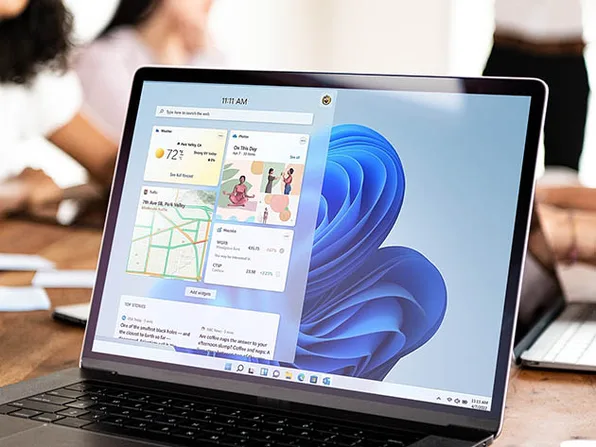
  • Innovative Interface: With Windows 11 Home, simplicity meets sophistication. The new interface is easier on the eyes and more intuitive to use, making it a breeze to navigate through your tasks and projects
  • Biometrics Login and Advanced Security: Upgrade your security with the Trusted Platform Module (TPM 2.0) and biometrics login, featuring encrypted authentication and advanced antivirus defenses that help prevent unwanted tampering
  • Cutting-Edge Gaming: Experience the latest games with life-like graphics through DirectX 12 Ultimate, which is ready to maximize your hardware for the ultimate gaming experience
  • Enhanced Productivity: With innovative features like Snap layouts, desktops and seamless redocking, Windows 11 Home gives you the tools to streamline your workflow and increase efficiency
  • Teams Connectivity: With integrated Microsoft Teams, you can stay in touch with friends and family without leaving your taskbar. Plus, with widgets that keep you updated on the content you love, you'll never miss a beat


*Hardware-dependent
**Feature and app availability may vary by region, and some features require specific hardware


Get answers from Copilot, Windows 11 AI-powered assistant


Copilot answers queries and helps you take action within Windows, like changing a setting, summarizing a web page, or opening a relevant app. 


  • Ask questions and get answers fast.
  • Artificial intelligence (AI) can generate imagery from your ideas.
  • Kickstart your writing process. 
  • Generate code suggestions while you type.
  • Integrate with platforms like GitHub for teamwork.


Find Copilot in Windows on the taskbar or press the Windows logo key + C for quick access. And if your keyboard has the Copilot key, you can also use that to launch Copilot in Windows.


Windows 11 Home Specifics

  • Windows 11 Home supports up to 128GB RAM
  • One CPU, and up to 64 CPU cores
  • Includes Microsoft Remote Desktop (client only)


Product Reviews

  • 4.0/5 rating on PC Magazine: ★ ★ ★ ★
  • 4.0/5 rating on TechRadar: ★ ★ ★ ★


Remember: Before purchasing, please check your computer compatibility with Windows 11 Home. This version is designed for PCs that need a new Windows license and meet the minimum system requirements for Windows 11.


Exceptional Deal Alert: Quality doesn't have to break the bank. With this outstanding deal, you can unlock the full potential of Windows 11 Home without stretching your budget. This offer strikes the perfect balance between excellence and value, ensuring you won't find a better deal on other reputable sites.

Specs

System Requirements

  • Your device must be running Windows 10 or Windows 10 Home, version 2004 or later, to upgrade
  • Processor: 1GHz
  • RAM: 4GB
  • Storage: 64GB or larger
  • System firmware: UEFI, Secure Boot-capable
  • TPM: Trusted Platform Module (TPM) version 2.0
  • Graphics card: Compatible with DirectX 12 or later with WDDM 2.0 driver
  • Display: high-definition (720p) display that is greater than 9” diagonally, 8 bits per color channel
  • To see complete system requirements, click here


Important Details

  • This license is for Windows 11 only. It is NOT intended to be used for upgrading Microsoft Office (MSO) included in Parallels Pro. However, it will still work with Parallels Pro and allow you to run Windows applications including MSO, but it DOES NOT include an upgrade MSO itself. It is still compatible with Microsoft Office ONLY if you have a separate license for it. 
  • Length of access: lifetime
  • Redemption deadline: redeem your code within 30 days of purchase
  • Access options: desktop ONLY
  • Max number of device(s): 1
  • Version: Windows 11 Home
  • Updates included
  • Click here to verify Microsoft partnership
  • Have questions on how digital purchases work? Learn more here
  • Learn more about our Lifetime deals here!


INSTANT REDEMPTION CODE: Receive your redemption code—and instructions to redeem the code for the product—via email immediately after purchase.


Terms

  • Unredeemed licenses can be returned for store credit within 30 days of purchase. Once your license is redeemed, all sales are final.
2372 Reviews
4.9/ 5
All reviews are from verified purchasers collected after purchase.
SP

Samuel Pinches

Verified Buyer

Worked perfectly. Good value, much cheaper than alternatives.

Apr 7, 2026
BL

Bruce Lima e Silva

Verified Buyer

I really love Windows 11 Pro because it delivers a modern, polished experience while still being powerful and reliable. The interface is clean and intuitive, productivity features like virtual desktops, Snap Layouts, and advanced multitasking make daily work much easier, and the Pro features (such as BitLocker, Remote Desktop, and better security controls) are a big plus. It runs smoothly, keeps improving with updates, and works well for both professional and personal use. Highly recommended!

Apr 7, 2026
JB

James Booras

Verified Buyer

The extras that it has over regular Windows 11. Pro is the way to go.

Apr 7, 2026
AE

Armand Emond

Verified Buyer

Seems to work well, price was great. would purchase again

Apr 7, 2026
MP

Markus Peltonen

Verified Buyer

Windows 11 Pro is a modern and feature-rich operating system designed mainly for professionals, advanced users, and business environments. It builds on the foundation of Windows 10 but introduces a refreshed design, improved productivity tools, and stronger security features. One of the biggest strengths of Windows 11 Pro is its advanced security and system control. Features like BitLocker encryption, Remote Desktop, and Hyper-V virtualization make it especially useful for users who need secure access, remote work capabilities, or virtual machines.  These tools are not available (or are limited) in the Home version, which makes Pro a better choice for power users. Performance and usability are also solid. The system is optimized for modern hardware and offers smoother multitasking with features like Snap layouts, virtual desktops, and improved workflow tools. Microsoft has also focused on combining performance, security, and manageability into one platform, making it suitable for both work and everyday use.  However, Windows 11 Pro is not perfect. Compared to Windows 10, some users find the interface changes unnecessary or less customizable. There are also occasional complaints about system bloat, updates, and built-in services that not everyone wants. For basic home use, many of the Pro features may feel unnecessary, since the Home version already covers most everyday needs.  Overall, Windows 11 Pro is a powerful and reliable operating system, especially if you need advanced features, better security, or professional tools. If you mainly browse, game, or do basic tasks, the extra features might not justify the upgrade—but for more demanding use, it’s a strong choice. Summary: • Excellent for work, security, and advanced users • Strong performance and modern interface • Some features are unnecessary for casual users • Interface changes may not suit everyone

Apr 7, 2026
JV

Jason Van Gundy

Verified Buyer

I purchased both Microsoft Office and Windows 11 Pro. To be completely honest, by business and my class life has improved 110%. The spreadsheets that I am able to create for both my business and the reports I've been able to turn in at college has brought both my grades and my income up at least 2 notches. I would highly recommend these two products.

Apr 7, 2026
Your Cart
Your cart is empty. Continue Shopping!
Processing order...